PyO3
Rust bindings for Python. This includes running and interacting with python code from a rust binaries as well as writing native python modules.
A comparison with rust-cpython can be found in the guide.
Usage
PyO3 supports python 2.7 as well as python 3.5 and up. The minimum required rust version is 1.30.0-nightly 2018-08-18.
You can either write a native python module in rust or use python from a rust binary.
On some OSs, you need some additional packages.
E.g. if you are on Ubuntu18.04, please run
sudo apt install python3-dev python-dev
Using rust from python
PyO3 can be used to generate a native python module.
Cargo.toml:
[package]
name = "string-sum"
version = "0.1.0"

[lib]
name = "string_sum"
crate-type = ["cdylib"]

[dependencies.pyo3]
version = "0.6.0"
features = ["extension-module"]
src/lib.rs
# #![allow(unused_variables)]
#fn main() {
# extern crate pyo3;
use pyo3::prelude::*;
use pyo3::wrap_pyfunction;

#[pyfunction]
/// Formats the sum of two numbers as string
fn sum_as_string(a: usize, b: usize) -> PyResult<String> {
    Ok((a + b).to_string())
}

/// This module is a python module implemented in Rust.
#[pymodule]
fn string_sum(py: Python, m: &PyModule) -> PyResult<()> {
    m.add_wrapped(wrap_pyfunction!(sum_as_string))?;

    Ok(())
}
#}
On windows and linux, you can build normally with cargo build --release. On macOS, you need to set additional linker arguments. One option is to compile with cargo rustc --release -- -C link-arg=-undefined -C link-arg=dynamic_lookup, the other is to create a .cargo/config with the following content:
[target.x86_64-apple-darwin]
rustflags = [
  "-C", "link-arg=-undefined",
  "-C", "link-arg=dynamic_lookup",
]
For developing, you can copy and rename the shared library from the target folder: On macOS, rename libstring_sum.dylib to string_sum.so, on windows libstring_sum.dll to string_sum.pyd and on linux libstring_sum.so to string_sum.so. Then open a python shell in the same folder and you'll be able to import string_sum.
To build, test and publish your crate as python module, you can use pyo3-pack or setuptools-rust. You can find an example for setuptools-rust in examples/word-count, while pyo3-pack should work on your crate without any configuration.
Using python from rust
Add pyo3 this to your Cargo.toml:
[dependencies]
pyo3 = "0.5"
Example program displaying the value of sys.version:
# extern crate pyo3;
use pyo3::prelude::*;
use pyo3::types::IntoPyDict;

fn main() -> PyResult<()> {
    let gil = Python::acquire_gil();
    let py = gil.python();
    let sys = py.import("sys")?;
    let version: String = sys.get("version")?.extract()?;

    let locals = [("os", py.import("os")?)].into_py_dict(py);
    let user: String = py.eval("os.getenv('USER') or os.getenv('USERNAME')", None, Some(&locals))?.extract()?;

    println!("Hello {}, I'm Python {}", user, version);
    Ok(())
}
Examples and tooling
- examples/word-count Counting the occurrences of a word in a text file
- hyperjson A hyper-fast Python module for reading/writing JSON data using Rust's serde-json
- rust-numpy Rust binding of NumPy C-API
- html-py-ever Using html5ever through kuchiki to speed up html parsing and css-selecting.
- pyo3-built Simple macro to expose metadata obtained with the
builtcrate as aPyDict - point-process High level API for pointprocesses as a Python library
- autopy A simple, cross-platform GUI automation library for Python and Rust.
- orjson Fast Python JSON library
Type Conversions
PyO3 provides some handy traits to convert between Python types and Rust types.
.extract()
The easiest way to convert a python object to a rust value is using .extract()?.
ToPyObject and IntoPyObject trait
ToPyObject trait is a conversion trait that allows various objects to be converted into PyObject. IntoPyObject serves the same purpose except it consumes self.
FromPyObject and RefFromPyObject trait
*args and **kwargs for python object call
There are several way how to pass positional and keyword arguments to python object call.
ObjectProtocol trait
provides two methods:
call- call callable python object.call_method- call specific method on the object.
Both methods accept args and kwargs arguments.
# extern crate pyo3;
use pyo3::prelude::*;
use pyo3::types::{PyDict, PyTuple};

struct SomeObject;
impl SomeObject {
    fn new(py: Python) -> PyObject {
        PyDict::new(py).to_object(py)
    }
}

fn main() {
    let arg1 = "arg1";
    let arg2 = "arg2";
    let arg3 = "arg3";

    let gil = Python::acquire_gil();
    let py = gil.python();

    let obj = SomeObject::new(py);

    // call object without empty arguments
    obj.call0(py);

    // call object with PyTuple
    let args = PyTuple::new(py, &[arg1, arg2, arg3]);
    obj.call1(py, args);

    // pass arguments as rust tuple
    let args = (arg1, arg2, arg3);
    obj.call1(py, args);
}
kwargs can by None or Some(&PyDict). You can use the
IntoPyDict trait to convert other dict-like containers, e.g. HashMap, BTreeMap as well as tuples with up to 10 elements and Vecs where each element is a two element tuple.
# extern crate pyo3;
use pyo3::prelude::*;
use pyo3::types::{IntoPyDict, PyDict};
use std::collections::HashMap;

struct SomeObject;

impl SomeObject {
    fn new(py: Python) -> PyObject {
        PyDict::new(py).to_object(py)
    }
}

fn main() {
    let key1 = "key1";
    let val1 = 1;
    let key2 = "key2";
    let val2 = 2;

    let gil = Python::acquire_gil();
    let py = gil.python();

    let obj = SomeObject::new(py);

    // call object with PyDict
    let kwargs = [(key1, val1)].into_py_dict(py);
    obj.call(py, (), Some(kwargs));

    // pass arguments as Vec
    let kwargs = vec![(key1, val1), (key2, val2)];
    obj.call(py, (), Some(kwargs.into_py_dict(py)));

    // pass arguments as HashMap
    let mut kwargs = HashMap::<&str, i32>::new();
    kwargs.insert(key1, 1);
    obj.call(py, (), Some(kwargs.into_py_dict(py)));
}
IntoPy<T>
Many conversions in PyO3 can't use std::convert::Into because they need a gil token. That's why the IntoPy<T> trait offers an into_py methods that works just like into except for taking a Python<'_> as argument.
Eventually, traits such as IntoPyObject will be replaces by this trait and a FromPy trait will be added that will implement IntoPy, just like with From and Into.
Python Exception
Define a new exception
You can use the create_exception! macro to define a new exception type:
# #![allow(unused_variables)]
#fn main() {
# extern crate pyo3;
use pyo3::create_exception;

create_exception!(module, MyError, pyo3::exceptions::Exception);
#}
moduleis the name of the containing module.MyErroris the name of the new exception type.
For example:
# extern crate pyo3;
use pyo3::prelude::*;
use pyo3::create_exception;
use pyo3::types::IntoPyDict;
use pyo3::exceptions::Exception;

create_exception!(mymodule, CustomError, Exception);

fn main() {
    let gil = Python::acquire_gil();
    let py = gil.python();
    let ctx = [("CustomError", py.get_type::<CustomError>())].into_py_dict(py);

    py.run("assert str(CustomError) == \"<class 'mymodule.CustomError'>\"", None, Some(&ctx)).unwrap();
    py.run("assert CustomError('oops').args == ('oops',)", None, Some(&ctx)).unwrap();
}
Raise an exception
To raise an exception, first you need to obtain an exception type and construct a new PyErr, then call PyErr::restore() method to write the exception back to the Python interpreter's global state.
# extern crate pyo3;
use pyo3::{Python, PyErr};
use pyo3::exceptions;

fn main() {
    let gil = Python::acquire_gil();
    let py = gil.python();
    PyErr::new::<exceptions::TypeError, _>("Error").restore(py);
    assert!(PyErr::occurred(py));
    drop(PyErr::fetch(py));
}
If you already have a Python exception instance, you can simply call PyErr::from_instance().
PyErr::from_instance(py, err).restore(py);
If rust type exists for exception, then it is possible to use new method.
For example each standard exception defined in exc module
has corresponding rust type, exceptions defined by create_exception! and import_exception! macro
have rust type as well.
# #![allow(unused_variables)]
#fn main() {
# extern crate pyo3;
# use pyo3::exceptions;
# use pyo3::prelude::*;
# fn check_for_error() -> bool {false}
fn my_func(arg: PyObject) -> PyResult<()> {
    if check_for_error() {
        Err(exceptions::ValueError::py_err("argument is wrong"))
    } else {
        Ok(())
    }
}
#}
Check exception type
Python has an isinstance method to check object type,
in PyO3 there is a Python::is_instance() method which does the same thing.
# extern crate pyo3;
use pyo3::Python;
use pyo3::types::{PyBool, PyList};

fn main() {
    let gil = Python::acquire_gil();
    let py = gil.python();
    assert!(py.is_instance::<PyBool, _>(PyBool::new(py, true)).unwrap());
    let list = PyList::new(py, &[1, 2, 3, 4]);
    assert!(!py.is_instance::<PyBool, _>(list.as_ref()).unwrap());
    assert!(py.is_instance::<PyList, _>(list.as_ref()).unwrap());
}
Python::is_instance() calls the underlying PyType::is_instance method to do the actual work.
To check the type of an exception, you can simply do:
# extern crate pyo3;
# use pyo3::exceptions;
# use pyo3::prelude::*;
# fn main() {
# let gil = Python::acquire_gil();
# let py = gil.python();
# let err = exceptions::TypeError::py_err(());
err.is_instance::<exceptions::TypeError>(py);
# }
Handle Rust Error
The vast majority of operations in this library will return PyResult<T>.
This is an alias for the type Result<T, PyErr>.
A PyErr represents a Python exception.
Errors within the PyO3 library are also exposed as Python exceptions.
PyO3 library handles python exception in two stages. During first stage PyErr instance get
created. At this stage python GIL is not required. During second stage, actual python
exception instance get crated and set to python interpreter.
In simple case, for custom errors support implementation of std::convert::From<T> trait
for this custom error is enough. PyErr::new accepts arguments in form
of ToPyObject + 'static. In case if 'static constraint can not be satisfied or
more complex arguments are required PyErrArgument
trait can be implemented. In that case actual exception arguments creation get delayed
until Python object is available.
use std::net::TcpListener;
use pyo3::{PyErr, PyResult, exc};

impl std::convert::From<std::io::Error> for PyErr {
    fn from(err: std::io::Error) -> PyErr {
        exceptions::OSError.into()
    }
}

fn connect(s: String) -> PyResult<bool> {
    TcpListener::bind("127.0.0.1:80")?;
    Ok(true)
}
The code snippet above will raise OSError in Python if TcpListener::bind() return an error.
std::convert::From<T> trait is implemented for most of the standard library's error
types so try! macro or ? operator can be used.
# #![allow(unused_variables)]
#fn main() {
# extern crate pyo3;
use pyo3::prelude::*;

fn parse_int(s: String) -> PyResult<usize> {
    Ok(s.parse::<usize>()?)
}
#}
The code snippet above will raise ValueError in Python if String::parse() return an error.
Using exceptions defined in python code
It is possible to use exception defined in python code as native rust types.
import_exception! macro allows to import specific exception class and defined zst type
for that exception.
# #![allow(unused_variables)]
#fn main() {
# extern crate pyo3;
use pyo3::prelude::*;
use pyo3::import_exception;

import_exception!(io, UnsupportedOperation);

fn tell(file: PyObject) -> PyResult<u64> {
    use pyo3::exceptions::*;

    let gil = Python::acquire_gil();
    let py = gil.python();

    match file.call_method0(py, "tell") {
        Err(_) => Err(UnsupportedOperation::py_err("not supported: tell")),
        Ok(x) => x.extract::<u64>(py),
    }
}

#}
exc defines exceptions for
several standard library modules.
Python Module
As shown in the Getting Started chapter, you can create a module as follows:
# extern crate pyo3;
use pyo3::prelude::*;

// add bindings to the generated python module
// N.B: names: "librust2py" must be the name of the `.so` or `.pyd` file
/// This module is implemented in Rust.
#[pymodule]
fn rust2py(py: Python, m: &PyModule) -> PyResult<()> {

    // PyO3 aware function. All of our python interface could be declared in a separate module.
    // Note that the `#[pyfn()]` annotation automatically converts the arguments from
    // Python objects to Rust values; and the Rust return value back into a Python object.
    #[pyfn(m, "sum_as_string")]
    fn sum_as_string_py(_py: Python, a:i64, b:i64) -> PyResult<String> {
       let out = sum_as_string(a, b);
       Ok(out)
    }

    Ok(())
}

// logic implemented as a normal rust function
fn sum_as_string(a:i64, b:i64) -> String {
    format!("{}", a + b).to_string()
}

# fn main() {}
The #[pymodule] procedural macro attribute takes care of exporting the initialization function of your module to Python. It takes one argument as the name of your module, which must be the name of the .so or .pyd file.
To import the module, either copy the shared library as described in Get Started or use a tool, e.g. pyo3-pack develop with pyo3-pack or python setup.py develop with setuptools-rust.
Documentation
The Rust doc comments of the module initialization function will be applied automatically as the Python doc string of your module.
import rust2py

print(rust2py.__doc__)
Which means that the above Python code will print This module is implemented in Rust..
Modules as objects
In python, modules are first class objects. This means can store them as values or add them to dicts or other modules:
# #![allow(unused_variables)]
#fn main() {
# extern crate pyo3;
use pyo3::prelude::*;
use pyo3::{wrap_pyfunction, wrap_pymodule};
use pyo3::types::PyDict;

#[pyfunction]
#[cfg(Py_3)]
fn subfunction() -> String {
    "Subfunction".to_string()
}

#[pymodule]
#[cfg(Py_3)]
fn submodule(_py: Python, module: &PyModule) -> PyResult<()> {
    module.add_wrapped(wrap_pyfunction!(subfunction))?;
    Ok(())
}

#[pymodule]
#[cfg(Py_3)]
fn supermodule(_py: Python, module: &PyModule) -> PyResult<()> {
    module.add_wrapped(wrap_pymodule!(submodule))?;
    Ok(())
}

#[cfg(Py_3)]
fn nested_call() {
    let gil = GILGuard::acquire();
    let py = gil.python();
    let supermodule = wrap_pymodule!(supermodule)(py);
    let ctx = [("supermodule", supermodule)].into_py_dict(py);

    py.run("assert supermodule.submodule.subfuntion() == 'Subfunction'", None, Some(&ctx)).unwrap();
}
#}
Python Function
PyO3 supports two ways to define a function in python. Both require registering the function to a module
One way is defining the function in the module definition.
# extern crate pyo3;
use pyo3::prelude::*;

#[pymodule]
fn rust2py(py: Python, m: &PyModule) -> PyResult<()> {

    // Note that the `#[pyfn()]` annotation automatically converts the arguments from
    // Python objects to Rust values; and the Rust return value back into a Python object.
    #[pyfn(m, "sum_as_string")]
    fn sum_as_string_py(_py: Python, a:i64, b:i64) -> PyResult<String> {
       Ok(format!("{}", a + b).to_string())
    }

    Ok(())
}

# fn main() {}
The other is annotating a function with #[pyfunction] and then adding it
to the module using the add_wrapped_to_module! macro, which takes the module
as first parameter, the function name as second and an instance of Python
as third.
# extern crate pyo3;
use pyo3::prelude::*;
use pyo3::wrap_pyfunction;

#[pyfunction]
fn double(x: usize) -> usize {
    x * 2
}

#[pymodule]
fn module_with_functions(py: Python, m: &PyModule) -> PyResult<()> {
    m.add_wrapped(wrap_pyfunction!(double)).unwrap();

    Ok(())
}

# fn main() {}
Making the function signature available to Python
In order to make the function signature available to Python to be retrieved via
inspect.signature, simply make sure the first line of your doc-string is
formatted like in the example below. Please note that the new-line after the
-- is mandatory. The / signifies the end of positional only arguments. This
is not a feature of this library in particular, but the general format used by
CPython for annotating signatures of built-in functions. Function signatures for
built-ins are new in Python 3 — in Python 2, it is simply considered to be part
of the doc-string.
# #![allow(unused_variables)]
#fn main() {
# extern crate pyo3;
use pyo3::prelude::*;

/// add(a, b, /)
/// --
///
/// This function adds two unsigned 64-bit integers.
#[pyfunction]
fn add(a: u64, b: u64) -> u64 {
    a + b
}
#}
When annotated like this, signatures are also correctly displayed in IPython.
>>> pyo3_test.add?
Signature: pyo3_test.add(a, b, /)
Docstring: This function adds two unsigned 64-bit integers.
Type:      builtin_function_or_method
Closures
Currently, there are no conversions between Fns in rust and callables in python. This would definitely be possible and very useful, so contributions are welcome. In the meantime, you can do the following:
Calling a python function in rust
You can use ObjectProtocol::is_callable to check if you got a callable, which is true for functions (including lambdas), methods and objects with a __call__ method. You can call the object with ObjectProtocol::call with the args as first parameter and the kwargs (or None) as second parameter. There are also ObjectProtocol::call0 with no args and ObjectProtocol::call1 with only the args.
Calling rust Fns in python
If you have a static function, you can expose it with #[pyfunction] and use wrap_pyfunction! to get the corresponding PyObject. For dynamic functions, e.g. lambda and functions that were passed as arguments, you must put them in some kind of owned container, e.g. a box. (Long-Term a special container similar to wasm-bindgen's Closure should take care of that). You can than use a #[pyclass] struct with that container as field as a way to pass the function over the ffi-barrier. You can even make that class callable with __call__ so it looks like a function in python code.
Python Class
Define new class
To define a custom python class, a rust struct needs to be annotated with the
#[pyclass] attribute.
# #![allow(unused_variables)]
#fn main() {
# extern crate pyo3;
# use pyo3::prelude::*;

#[pyclass]
struct MyClass {
   num: i32,
   debug: bool,
}
#}
The above example generates implementations for PyTypeInfo and PyTypeObject for MyClass.
Get Python objects from pyclass
You can use pyclasses like normal rust structs.
However, if instantiated normally, you can't treat pyclasses as Python objects.
To get a Python object which includes pyclass, we have to use some special methods.
PyRef
PyRef is a special reference, which ensures that the referred struct is a part of
a Python object, and you are also holding the GIL.
You can get an instance of PyRef by PyRef::new, which does 3 things:
- Allocate a Python object in the Python heap
- Copies the rust struct into the Python object
- Returns a reference of it
You can use PyRef just like &T, because it implements Deref<Target=T>.
# #![allow(unused_variables)]
#fn main() {
# extern crate pyo3;
# use pyo3::prelude::*;
# use pyo3::types::PyDict;
#[pyclass]
struct MyClass {
   num: i32,
   debug: bool,
}
let gil = Python::acquire_gil();
let py = gil.python();
let obj = PyRef::new(py, MyClass { num: 3, debug: true }).unwrap();
assert_eq!(obj.num, 3);
let dict = PyDict::new(py);
// You can treat a `PyRef` as a Python object
dict.set_item("obj", obj).unwrap();
#}
PyRefMut
PyRefMut is a mutable version of PyRef.
# #![allow(unused_variables)]
#fn main() {
# extern crate pyo3;
# use pyo3::prelude::*;
#[pyclass]
struct MyClass {
   num: i32,
   debug: bool,
}
let gil = Python::acquire_gil();
let py = gil.python();
let mut obj = PyRefMut::new(py, MyClass { num: 3, debug: true }).unwrap();
obj.num = 5;
#}
Py
Py is a object wrapper which stores an object longer than the GIL lifetime.
You can use it to avoid lifetime problems.
# #![allow(unused_variables)]
#fn main() {
# extern crate pyo3;
# use pyo3::prelude::*;
#[pyclass]
struct MyClass {
   num: i32,
}
fn return_myclass() -> Py<MyClass> {
    let gil = Python::acquire_gil();
    let py = gil.python();
    Py::new(py, MyClass { num: 1 }).unwrap()
}
let gil = Python::acquire_gil();
let obj = return_myclass();
assert_eq!(obj.as_ref(gil.python()).num, 1);
#}
Customizing the class
The #[pyclass] macro accepts following parameters:
name=XXX- Set the class name shown in python code. By default struct name is used as a class name.freelist=XXX-freelistparameter add support of free allocation list to custom class. The performance improvement applies to types that are often created and deleted in a row, so that they can benefit from a freelist.XXXis a number of items for free list.gc- Classes with thegcparameter participate in python garbage collector. If a custom class contains references to other python object that can be collected, thePyGCProtocoltrait has to be implemented.weakref- adds support for python weak referencesextends=BaseType- use a custom base class. The base BaseType must implementPyTypeInfo.subclass- Allows Python classes to inherit from this classdict- adds__dict__support, the instances of this type have a dictionary containing instance variables.
Constructor
By default it is not possible to create an instance of a custom class from python code.
To declare a constructor, you need to define a class method and annotate it with #[new]
attribute. Only the python __new__ method can be specified, __init__ is not available.
# #![allow(unused_variables)]
#fn main() {
# extern crate pyo3;
# use pyo3::prelude::*;
# use pyo3::PyRawObject;
#[pyclass]
struct MyClass {
   num: i32,
}

#[pymethods]
impl MyClass {

     #[new]
     fn new(obj: &PyRawObject, num: i32) {
         obj.init({
             MyClass {
                 num,
             }
         });
     }
}
#}
Rules for the new method:
- If no method marked with
#[new]is declared, object instances can only be created from Rust, but not from Python. - The first parameter is the raw object and the custom
newmethod must initialize the object with an instance of the struct usinginitmethod. The type of the object may be the type object of a derived class declared in Python. - The first parameter implicitly has type
&PyRawObject. - For details on
parameter-list, see the documentation ofMethod argumentssection. - The return type must be
PyResult<T>for someTthat implementsIntoPyObject. Usually,Twill beMyType.
Inheritance
By default PyObject is used as default base class. To override default base class
base parameter for class needs to be used. Value is full path to base class.
new method accepts PyRawObject object. obj instance must be initialized
with value of custom class struct. Subclass must call parent's new method.
# extern crate pyo3;
# use pyo3::prelude::*;
# use pyo3::PyRawObject;
#[pyclass]
struct BaseClass {
   val1: usize,
}

#[pymethods]
impl BaseClass {
   #[new]
   fn new(obj: &PyRawObject) {
       obj.init(BaseClass{ val1: 10 });
   }

   pub fn method(&self) -> PyResult<()> {
      Ok(())
   }
}

#[pyclass(extends=BaseClass)]
struct SubClass {
   val2: usize,
}

#[pymethods]
impl SubClass {
   #[new]
   fn new(obj: &PyRawObject) {
       obj.init(SubClass{ val2: 10 });
       BaseClass::new(obj);
   }

   fn method2(&self) -> PyResult<()> {
      self.get_base().method()
   }
}
ObjectProtocol trait provides get_base() method. It returns reference to instance of
base class.
Object properties
Descriptor methods can be defined in
#[pymethods] impl block only and has to be annotated with #[getter] or [setter]
attributes. i.e.
# #![allow(unused_variables)]
#fn main() {
# extern crate pyo3;
# use pyo3::prelude::*;
# #[pyclass]
# struct MyClass {
#    num: i32,
# }
#
#[pymethods]
impl MyClass {

     #[getter]
     fn num(&self) -> PyResult<i32> {
        Ok(self.num)
     }
}
#}
Getter or setter function's name is used as property name by default. There are several ways how to override name.
If function name starts with get_ or set_ for getter or setter respectively.
Descriptor name becomes function name with prefix removed. This is useful in case of
rust's special keywords like type.
# extern crate pyo3;
# use pyo3::prelude::*;
# #[pyclass]
# struct MyClass {
#    num: i32,
# }
#
#[pymethods]
impl MyClass {

     #[getter]
     fn get_num(&self) -> PyResult<i32> {
        Ok(self.num)
     }

     #[setter]
     fn set_num(&mut self, value: i32) -> PyResult<()> {
        self.num = value;
        Ok(())
     }
}
In this case property num is defined. And it is available from python code as self.num.
Also both #[getter] and #[setter] attributes accepts one parameter.
If this parameter is specified, it is used as a property name. i.e.
# extern crate pyo3;
# use pyo3::prelude::*;
# #[pyclass]
# struct MyClass {
#    num: i32,
# }
#
#[pymethods]
impl MyClass {

     #[getter(number)]
     fn num(&self) -> PyResult<i32> {
        Ok(self.num)
     }

     #[setter(number)]
     fn set_num(&mut self, value: i32) -> PyResult<()> {
        self.num = value;
        Ok(())
     }
}
In this case the property number is defined and is available from python code as self.number.
For simple cases you can also define getters and setters in your Rust struct field definition, for example:
# extern crate pyo3;
# use pyo3::prelude::*;
#[pyclass]
struct MyClass {
  #[pyo3(get, set)]
  num: i32
}
Then it is available from Python code as self.num.
Instance methods
To define a python compatible method, impl block for struct has to be annotated with the
#[pymethods] attribute. PyO3 generates python compatible wrappers for all functions in this
block with some variations, like descriptors, class method static methods, etc.
# #![allow(unused_variables)]
#fn main() {
# extern crate pyo3;
# use pyo3::prelude::*;
# #[pyclass]
# struct MyClass {
#    num: i32,
# }
#
#[pymethods]
impl MyClass {

     fn method1(&self) -> PyResult<i32> {
        Ok(10)
     }

     fn set_method(&mut self, value: i32) -> PyResult<()> {
        self.num = value;
        Ok(())
     }
}
#}
Calls to this methods protected by GIL, &self or &mut self can be used.
The return type must be PyResult<T> for some T that implements IntoPyObject.
Python parameter can be specified as part of method signature, in this case py argument
get injected by method wrapper. i.e
# #![allow(unused_variables)]
#fn main() {
# extern crate pyo3;
# use pyo3::prelude::*;
# #[pyclass]
# struct MyClass {
#    num: i32,
#    debug: bool,
# }

#[pymethods]
impl MyClass {
     fn method2(&self, py: Python) -> PyResult<i32> {
        Ok(10)
     }
}
#}
From python perspective method2, in above example, does not accept any arguments.
Class methods
To specify a class method for a custom class, the method needs to be annotated
with the #[classmethod] attribute.
# #![allow(unused_variables)]
#fn main() {
# extern crate pyo3;
# use pyo3::prelude::*;
# use pyo3::types::PyType;
# #[pyclass]
# struct MyClass {
#    num: i32,
#    debug: bool,
# }

#[pymethods]
impl MyClass {
     #[classmethod]
     fn cls_method(cls: &PyType) -> PyResult<i32> {
        Ok(10)
     }
}
#}
Declares a class method callable from Python.
- The first parameter is the type object of the class on which the method is called. This may be the type object of a derived class.
- The first parameter implicitly has type
&PyType. - For details on
parameter-list, see the documentation ofMethod argumentssection. - The return type must be
PyResult<T>for someTthat implementsIntoPyObject.
Static methods
To specify a static method for a custom class, method needs to be annotated with
#[staticmethod] attribute. The return type must be PyResult<T> for some T that implements
IntoPyObject.
# #![allow(unused_variables)]
#fn main() {
# extern crate pyo3;
# use pyo3::prelude::*;
# #[pyclass]
# struct MyClass {
#    num: i32,
#    debug: bool,
# }

#[pymethods]
impl MyClass {
     #[staticmethod]
     fn static_method(param1: i32, param2: &str) -> PyResult<i32> {
        Ok(10)
     }
}
#}
Callable object
To specify a custom __call__ method for a custom class, call methods need to be annotated with
the #[call] attribute. Arguments of the method are specified same as for instance method.
# #![allow(unused_variables)]
#fn main() {
# extern crate pyo3;
# use pyo3::prelude::*;
use pyo3::types::PyTuple;
# #[pyclass]
# struct MyClass {
#    num: i32,
#    debug: bool,
# }

#[pymethods]
impl MyClass {
     #[call]
     #[args(args="*")]
     fn __call__(&self, args: &PyTuple) -> PyResult<i32> {
        println!("MyClass has been called");
        Ok(self.num)
     }
}
#}
Method arguments
By default PyO3 uses function signatures to determine which arguments are required. Then it scans
incoming args parameter and then incoming kwargs parameter. If it can not find all required
parameters, it raises a TypeError exception. It is possible to override the default behavior
with #[args(...)] attribute. args attribute accepts a comma separated list of parameters in
form of attr_name="default value". Each parameter has to match the method parameter by name.
Each parameter could be one of following type:
- "*": var arguments separator, each parameter defined after "*" is keyword only parameters.
corresponds to python's
def meth(*, arg1.., arg2=..) - args="*": "args" is var args, corresponds to python's
def meth(*args). Type ofargsparameter has to be&PyTuple. - kwargs="**": "kwargs" is keyword arguments, corresponds to python's
def meth(**kwargs). Type ofkwargsparameter has to beOption<&PyDict>. - arg="Value": arguments with default value. corresponds to python's
def meth(arg=Value). ifargargument is defined after var arguments it is treated as keyword argument. Note thatValuehas to be valid rust code, PyO3 just inserts it into generated code unmodified.
Example:
# #![allow(unused_variables)]
#fn main() {
# extern crate pyo3;
# use pyo3::prelude::*;
use pyo3::types::{PyDict, PyTuple};
#
# #[pyclass]
# struct MyClass {
#    num: i32,
#    debug: bool,
# }
#
#[pymethods]
impl MyClass {
    #[args(arg1=true, args="*", arg2=10, kwargs="**")]
    fn method(&self, arg1: bool, args: &PyTuple, arg2: i32, kwargs: Option<&PyDict>) -> PyResult<i32> {
        Ok(1)
    }
}
#}
Class customizations
Python's object model defines several protocols for different object behavior, like sequence,
mapping or number protocols. PyO3 defines separate traits for each of them. To provide specific
python object behavior you need to implement the specific trait for your struct. Important note,
each protocol implementation block has to be annotated with #[pyproto] attribute.
Basic object customization
PyObjectProtocol trait provide several basic customizations.
Attribute access
To customize object attribute access define following methods:
fn __getattr__(&self, name: FromPyObject) -> PyResult<impl IntoPyObject>fn __setattr__(&mut self, name: FromPyObject, value: FromPyObject) -> PyResult<()>fn __delattr__(&mut self, name: FromPyObject) -> PyResult<()>
Each methods corresponds to python's self.attr, self.attr = value and del self.attr code.
String Conversions
-
fn __repr__(&self) -> PyResult<impl ToPyObject<ObjectType=PyString>> -
fn __str__(&self) -> PyResult<impl ToPyObject<ObjectType=PyString>>Possible return types for
__str__and__repr__arePyResult<String>orPyResult<PyString>. In Python 2.7, Unicode strings returned by__str__and__repr__will be converted to byte strings by the Python runtime, which results in an exception if the string contains non-ASCII characters. -
fn __bytes__(&self) -> PyResult<PyBytes>On Python 3.x, provides the conversion to
bytes. On Python 2.7,__bytes__is allowed but has no effect. -
fn __unicode__(&self) -> PyResult<PyUnicode>On Python 2.7, provides the conversion to
unicode. On Python 3.x,__unicode__is allowed but has no effect. -
fn __format__(&self, format_spec: &str) -> PyResult<impl ToPyObject<ObjectType=PyString>>Special method that is used by the
format()builtin and thestr.format()method. Possible return types arePyResult<String>orPyResult<PyString>.
Comparison operators
-
fn __richcmp__(&self, other: impl FromPyObject, op: CompareOp) -> PyResult<impl ToPyObject>Overloads Python comparison operations (
==,!=,<,<=,>, and>=). Theopargument indicates the comparison operation being performed. The return type will normally bePyResult<bool>, but any Python object can be returned. Ifotheris not of the type specified in the signature, the generated code will automaticallyreturn NotImplemented. -
fn __hash__(&self) -> PyResult<impl PrimInt>Objects that compare equal must have the same hash value. The return type must be
PyResult<T>whereTis one of Rust's primitive integer types.
Other methods
-
fn __bool__(&self) -> PyResult<bool>Determines the "truthiness" of the object. This method works for both python 3 and python 2, even on Python 2.7 where the Python spelling was
__nonzero__.
Garbage Collector Integration
If your type owns references to other python objects, you will need to
integrate with Python's garbage collector so that the GC is aware of
those references.
To do this, implement PyGCProtocol trait for your struct.
It includes two methods __traverse__ and __clear__.
These correspond to the slots tp_traverse and tp_clear in the Python C API.
__traverse__ must call visit.call() for each reference to another python object.
__clear__ must clear out any mutable references to other python objects
(thus breaking reference cycles). Immutable references do not have to be cleared,
as every cycle must contain at least one mutable reference.
Example:
# #![allow(unused_variables)]
#fn main() {
extern crate pyo3;

use pyo3::prelude::*;
use pyo3::PyTraverseError;
use pyo3::gc::{PyGCProtocol, PyVisit};

#[pyclass]
struct ClassWithGCSupport {
    obj: Option<PyObject>,
}

#[pyproto]
impl PyGCProtocol for ClassWithGCSupport {
    fn __traverse__(&self, visit: PyVisit) -> Result<(), PyTraverseError> {
        if let Some(ref obj) = self.obj {
            visit.call(obj)?
        }
        Ok(())
    }

    fn __clear__(&mut self) {
        if let Some(obj) = self.obj.take() {
          // Release reference, this decrements ref counter.
          let gil = GILGuard::acquire();
          let py = gil.python();
          py.release(obj);
        }
    }
}
#}
Special protocol trait implementations have to be annotated with the #[pyproto] attribute.
It is also possible to enable GC for custom class using gc parameter for class annotation.
i.e. #[pyclass(gc)]. In that case instances of custom class participate in python garbage
collector, and it is possible to track them with gc module methods.
Iterator Types
Iterators can be defined using the
PyIterProtocol trait.
It includes two methods __iter__ and __next__:
fn __iter__(slf: PyRefMut<Self>) -> PyResult<impl IntoPyObject>fn __next__(slf: PyRefMut<Self>) -> PyResult<Option<impl IntoPyObject>>
Returning Ok(None) from __next__ indicates that that there are no further items.
Example:
# #![allow(unused_variables)]
#fn main() {
extern crate pyo3;

use pyo3::prelude::*;
use pyo3::PyIterProtocol;

#[pyclass]
struct MyIterator {
    iter: Box<Iterator<Item = PyObject> + Send>,
}

#[pyproto]
impl PyIterProtocol for MyIterator {
    fn __iter__(slf: PyRefMut<Self>) -> PyResult<Py<MyIterator>> {
        Ok(slf.into())
    }
    fn __next__(mut slf: PyRefMut<Self>) -> PyResult<Option<PyObject>> {
        Ok(slf.iter.next())
    }
}
#}
Manually implementing pyclass
TODO: Which traits to implement (basically PyTypeCreate: PyObjectAlloc + PyTypeInfo + PyMethodsProtocol + Sized) and what they mean.
How methods are implemented
Users should be able to define a #[pyclass] with or without #[pymethods], while PyO3 needs a
trait with a function that returns all methods. Since it's impossible to make the code generation in
pyclass dependent on whether there is an impl block, we'd need to implement the trait on
#[pyclass] and override the implementation in #[pymethods], which is to the best of my knowledge
only possible with the specialization feature, which can't be used on stable.
To escape this we use inventory, which allows us to collect impls from arbitrary source code by exploiting some binary trick. See inventory: how it works and pyo3_derive_backend::py_class::impl_inventory for more details.
Parallelism
CPython has an infamous GIL(Global Interpreter Lock) prevents developers getting true parallelism. With PyO3 you can release GIL when executing Rust code to achieve true parallelism.
The Python::allow_threads
method temporarily releases the GIL, thus allowing other Python threads to run.
impl Python {
    pub fn allow_threads<T, F>(self, f: F) -> T where F: Send + FnOnce() -> T {}
}
Let's take a look at our word-count example,
we have a wc_parallel function utilize the rayon crate to count words in parallel.
fn wc_parallel(lines: &str, search: &str) -> i32 {
    lines.par_lines()
         .map(|line| wc_line(line, search))
         .sum()
}
Then in the Python bridge, we have a function search exposed to Python runtime which calls wc_parallel inside
Python::allow_threads method to enable true parallelism:
#[pymodule]
fn word_count(py: Python, m: &PyModule) -> PyResult<()> {

    #[pyfn(m, "search")]
    fn search(py: Python, path: String, search: String) -> PyResult<i32> {
        let mut file = File::open(path)?;
        let mut contents = String::new();
        file.read_to_string(&mut contents)?;

        let count = py.allow_threads(move || wc_parallel(&contents, &search));
        Ok(count)
    }

    Ok(())
}
Benchmark
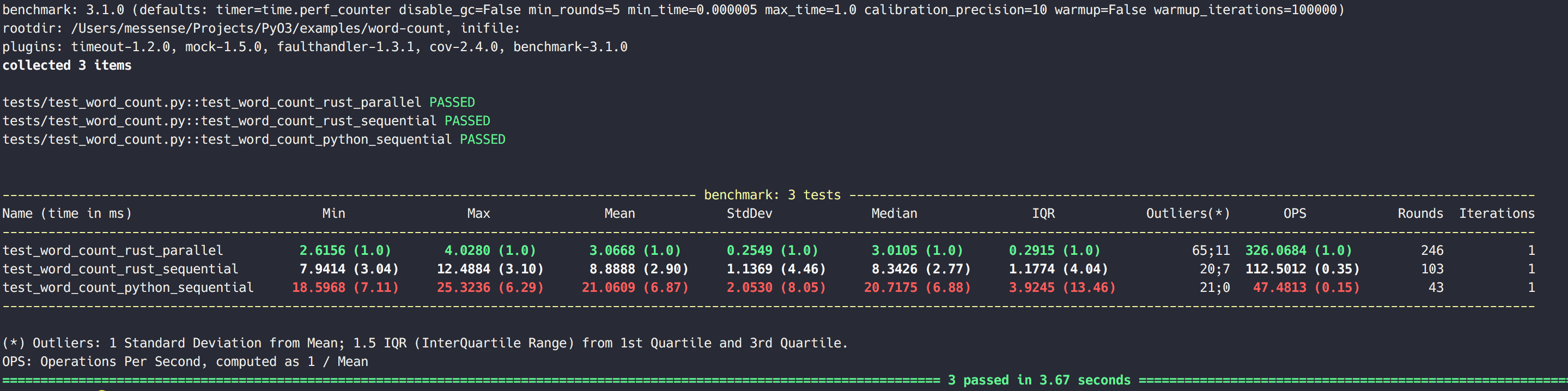
Let's benchmark the word-count example to verify that we did unlock true parallelism with PyO3.
We are using pytest-benchmark to benchmark three word count functions:
Benchmark script can be found here,
then we can run pytest tests to benchmark them.
On MacBook Pro (Retina, 15-inch, Mid 2015) the benchmark gives:
Debugging
Macros
PyO3's attributes, #[pyclass], #[pymodule], etc. are procedural macros, which means that rewrite the source of the annotated item. You can view the generated source with the following command, which also expands a few other things:
cargo rustc --profile=check -- -Z unstable-options --pretty=expanded > expanded.rs; rustfmt expanded.rs
(You might need to install rustfmt if you don't already have it.)
You can also debug classic !-macros by adding -Z trace-macros`:
cargo rustc --profile=check -- -Z unstable-options --pretty=expanded -Z trace-macros > expanded.rs; rustfmt expanded.rs
See cargo expand for a more elaborate version of those commands.
Running with Valgrind
Valgrind is a tool to detect memory management bugs such as memory leaks.
You first need to install a debug build of python, otherwise valgrind won't produce usable results. In ubuntu there's e.g. a python3-dbg package.
Activate an environment with the debug interpreter and recompile. If you're on linux, use ldd with the name of you're binary and check that you're linking e.g. libpython3.6dm.so.1.0 instead of libpython3.6m.so.1.0.
Download the suppressions file for cpython.
Run valgrind with valgrind --suppressions=valgrind-python.supp ./my-command --with-options
Getting a stacktrace
The best start to investigate a crash such as an segmentation fault is a backtrace.
- Link against a debug build of python as described in the previous chapter
- Run
gdb <my-binary> - Enter
rto run - After the crash occurred, enter
btorbt fullto print the stacktrace
Advanced topics
ffi
PyO3 exposes much of python's C api through the ffi.
The C api is naturally unsafe and requires you to manage reference counts, errors and specific invariants yourself. Please refer to the C API Reference Manual and The Rustonomicon before using any function from that api.
Testing
Currently, #341 causes cargo test to fail with weird linking errors when the extension-module feature is activated. For nnow you can work around this by making the extension-module feature optional and running the tests with cargo test --no-default-features:
[dependencies.pyo3]
version = "0.6.0"

[features]
extension-module = ["pyo3/extension-module"]
default = ["extension-module"]
Building and Distribution
Python version
PyO3 uses a build script to determine the python version and set the correct linker arguments. By default it uses the python3 executable. With the python2 feature it uses the python2 executable. You can override the python interpreter by setting PYTHON_SYS_EXECUTABLE.
Linking
Different linker arguments must be set for libraries/extension modules and binaries, which includes both standalone binaries and tests. (More specifically, binaries must be told where to find libpython and libraries must not link to libpython for manylinux compliance).
Since PyO3's build script can't know whether you're building a binary or a library, you have to activate the extension-module feature to get the build options for a library, or it'll default to binary.
If you have e.g. a library crate and a profiling crate alongside, you need to use optional features. E.g. you put the following in the library crate:
[dependencies]
pyo3 = "0.5.2"

[lib]
name = "hyperjson"
crate-type = ["rlib", "cdylib"]

[features]
default = ["pyo3/extension-module"]
And this in the profiling crate:
[dependencies]
my_main_crate = { path = "..", default-features = false }
pyo3 = "0.5.2"
On linux/mac you might have to change LD_LIBRARY_PATH to include libpython, while on windows you might need to set LIB to include pythonxy.lib (where x and y are major and minor version), which is normally either in the libs or Lib folder of a python installation.
Distribution
There are two ways to distribute your module as python package: The old setuptools-rust and the new pyo3-pack. setuptools-rust needs some configuration files (setup.py, MANIFEST.in, build-wheels.sh, etc.) and external tools (docker, twine). pyo3-pack doesn't need any configuration files. It can not yet build sdist though (pyo3/pyo3-pack#2).
Cross Compiling
Cross compiling PyO3 modules is relatively straightforward and requires a few pieces of software:
- A toolchain for your target.
- The appropriate options in your Cargo
.configfor the platform you're targeting and the toolchain you are using. - A Python interpreter that's already been compiled for your target.
- The headers that match the above interpreter.
See https://github.com/japaric/rust-cross for a primer on cross compiling Rust in general.
After you've obtained the above, you can build a cross compiled Pyo3 module by setting a few extra environment variables:
PYO3_CROSS_INCLUDE_DIR: This variable must be set to the directory containing the headers for the target's python interpreter.PYO3_CROSS_LIB_DIR: This variable must be set to the directory containing the target's libpython DSO.
An example might look like the following (assuming your target's sysroot is at /home/pyo3/cross/sysroot and that your target is armv7):
export PYO3_CROSS_INCLUDE_DIR="/home/pyo3/cross/sysroot/usr/include"
export PYO3_CROSS_LIB_DIR="/home/pyo3/cross/sysroot/usr/lib"

cargo build --target armv7-unknown-linux-gnueabihf
Appendix: PyO3 and rust-cpython
PyO3 began as fork of rust-cpython when rust-cpython wasn't maintained. Over the time pyo3 has become fundamentally different from rust-cpython.
This chapter is based on the discussion in PyO3/pyo3#55.
Macros
While rust-cpython has a macro based dsl for declaring modules and classes, PyO3 use proc macros and specialization. PyO3 also doesn't change your struct and functions so you can still use them as normal rust functions. The disadvantage is that proc macros and specialization currently only work on nightly.
rust-cpython
py_class!(class MyClass |py| {
    data number: i32;
    def __new__(_cls, arg: i32) -> PyResult<MyClass> {
        MyClass::create_instance(py, arg)
    }
    def half(&self) -> PyResult<i32> {
        Ok(self.number(py) / 2)
    }
});
pyo3
# #![allow(unused_variables)]
#fn main() {
# extern crate pyo3;
use pyo3::prelude::*;
use pyo3::PyRawObject;

#[pyclass]
struct MyClass {
   num: u32,
}

#[pymethods]
impl MyClass {
    #[new]
    fn new(obj: &PyRawObject, num: u32) {
        obj.init({
            MyClass {
                num,
            }
        });
    }

    fn half(&self) -> PyResult<u32> {
        Ok(self.num / 2)
    }
}
#}
Ownership and lifetimes
All objects are owned by PyO3 library and all apis available with references, while in rust-cpython, you own python objects.
Here is example of PyList api:
rust-cpython
impl PyList {

   fn new(py: Python) -> PyList {...}

   fn get_item(&self, py: Python, index: isize) -> PyObject {...}
}
pyo3
impl PyList {

   fn new(py: Python) -> &PyList {...}

   fn get_item(&self, index: isize) -> &PyObject {...}
}
Because PyO3 allows only references to python object, all reference have the Gil lifetime. So the python object is not required, and it is safe to have functions like fn py<'p>(&'p self) -> Python<'p> {}.
Error handling
rust-cpython requires a Python parameter for PyErr, so error handling ergonomics is pretty bad. It is not possible to use ? with rust errors.
PyO3 on other hand does not require Python for PyErr, it is only required if you want to raise an exception in python with the PyErr::restore() method. Due to the std::convert::From<Err> for PyErr trait ? is supported automatically.